
Still comparing AI tools based on typing speed? In 2026, AI isn’t just a chatbot—it’s the virtual assistant that could give you back 20+ hours per week. For solopreneurs and freelancers, that $20 monthly subscription isn’t just a software cost—it’s an investment in a digital employee. In this guide, I compare ChatGPT vs Gemini vs Claude to help solopreneurs choose the best AI tool in 2026 based on real workflows, not hype.
This comprehensive guide reveals which AI delivers the best ROI for YOUR specific workflow, backed by real-world testing, productivity metrics, and money-making scenarios. Plus, discover my exclusive automation roadmap in the appendix.
✏️ Quick Summary: The AI Evolution at a Glance (2024-2026)
Understanding where AI came from helps you choose the right tool for where it’s going.
- 2024 | The Chatbot Era: A smart dictionary that answers when you ask.
- 2025 | The Reasoning Revolution: With GPT-o1 and Claude 3.5 introduced in late 2024, AI began thinking and planning—shifting from reactive to proactive problem-solving.
- 2026 | The Agent Era (Where We Are Now): AI sees your screen, sends emails, manages schedules, and automates workflows as a semi-autonomous assistant. With integrations, it can even support payment-related tasks.
Key difference: In 2024, you asked AI to write an email. In 2026, you tell AI to “handle customer inquiries” and it drafts responses, schedules follow-ups, and updates your CRM—all waiting for your final approval.
???? Throughout this post, look for “Expert Tips” to ensure data security and operational safety as you implement AI agents in your workflow.
Must-Know Terms Before Choosing Your AI
Before diving into feature comparisons, understand these three factors that actually impact your daily productivity. These aren’t just technical specs—they determine whether AI becomes your most productive team member or an expensive distraction.
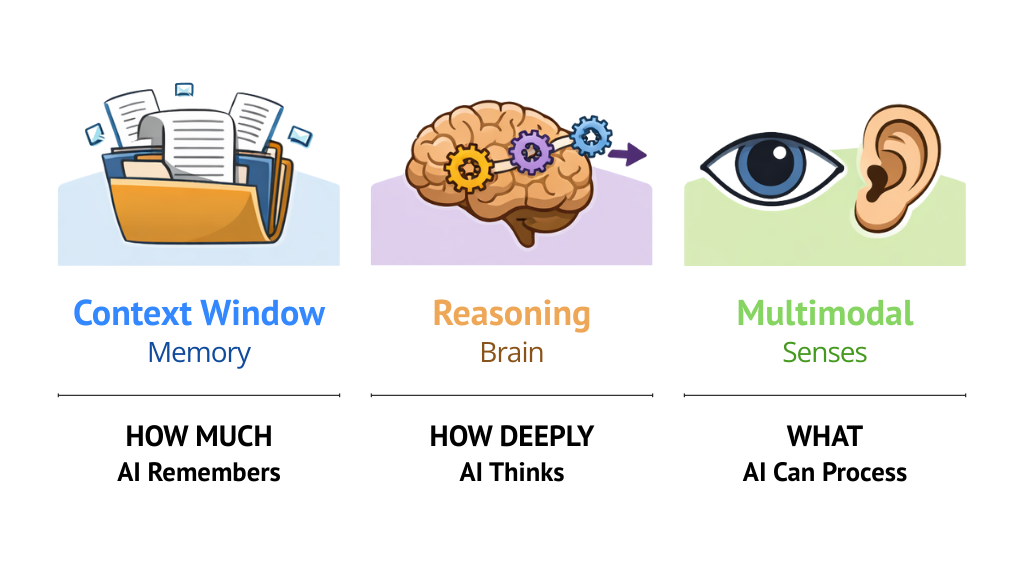
Context Window (The “Memory”)
How much information AI can remember in a single conversation.
Why you care: A small context window is like talking to someone with severe short-term memory loss—you’re constantly re-explaining everything. On the other hand, a large context window is like working with a sharp colleague who remembers every conversation you’ve ever had.
This matters if you:
- Analyze long PDFs or contracts
- Write detailed reports that reference multiple sources
- Review large codebases or technical documentation
- Manage ongoing client relationships with complex histories
Reasoning (The “Brain”)
The ability to think through problems step-by-step, not just pattern-match answers.
Why you care: Because you need strategic thinking, not just answers. When you ask “How should I sell this product?”, you want a step-by-step plan that considers the why—not a generic tip from a search engine.
This matters if you:
- Need strategic planning, not generic advice
- Work with complex multi-variable problems
- Make decisions that require weighing trade-offs
- Build systems or architecture (business or technical)
Multimodal (The “Senses”)
AI that can see, hear, and understand—not just read text.
Why you care: Because your work doesn’t happen in a text box. You’re sending screenshots, sharing photos, reviewing invoices, and analyzing data visualizations all day.
This matters if you:
- Work with visual assets (product photos, designs, diagrams)
- Handle data-heavy documents (reports, invoices, analytics)
- Need to analyze competitors’ materials
- Manage physical products or inventory
✏️ Quick Summary: What This Means for Your Business
The truth: You don’t need to understand the technical details. You just need to know which capability matters most for YOUR work—because that’s how you choose the right AI.
- Lots of documents, complex projects? → Context matters most
- Strategic decisions, custom solutions? → Reasoning matters most
- Visual work, data analysis? → Multimodal matters most
These three factors—context window, reasoning, and multimodal capability—are what truly separate ChatGPT, Gemini, and Claude in real business use. Now that you know what actually matters, let’s see how ChatGPT, Gemini, and Claude stack up where it counts: real workflows.
Multimodal AI in 2026: How ChatGPT, Gemini, and Claude Work
The era of AI simply describing photos is over. In 2026, multimodal AI jumps directly into your business operations.
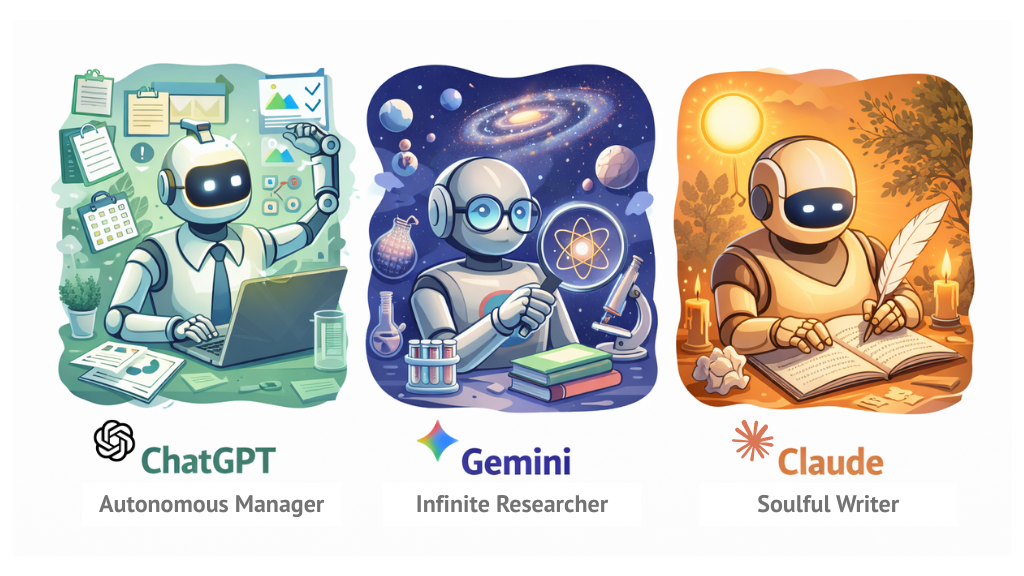
ChatGPT (GPT-5.2)
Your Real-time Business Partner (Advanced Vision & Voice)
- Best for: Solopreneurs who need workflow automation, complex logic design, and real-time business coaching.
- Use Case: Real-time meeting coaching and inventory management.
- How-to:
- In mobile app, tap the ‘Use Voice’ icon in the message box to activate voice mode, then enable the ‘Camera’ icon.
- Show your screen and say: “Hey, I’m reviewing a proposal right now. What’s the weakest argument here?”
- Starter Tip: Start with the free plan first. If you find yourself asking “Find logical flaws” more than five times a day, that’s when upgrading to a paid plan makes sense.
Gemini (3 Pro)
Your Infinite Data Curator (Video & Google Ecosystem)
- Best for: Data analysts, Google Workspace power users, and video-based learners.
- Use Case: YouTube short-form content factory and integrated Google Drive search.
- How-to:
- Type
@Google Drivein the chat to connect your Drive data. - Paste a YouTube link and command: “Based on this video content, revise the marketing proposal draft in my Drive.”
- Type
- Starter Tip: If you’re an Android user, replace ‘Google Assistant’ with Gemini. Building the habit of starting every daily question with AI is what matters most.
Claude (Opus 4.5)
Your Creative Collaborator (Visual Reasoning & Artifacts 2.0)
- Best for: High-quality content creators, social media creators, and coding beginners.
- Use Case: Turn a napkin sketch into a live website (Artifacts 2.0).
- How-to:
- Click the ‘clip (attachment)’ icon next to the chat box to upload photos or design sketches.
- When the ‘Artifacts’ panel appears on the right side of the screen, AI writes code in real-time and renders an actual app interface right before your eyes.
- Starter Tip: Instead of asking “Write a story,” start with “Critique my writing style.” Letting Claude learn your style is the crucial first step.
✏️ Quick Summary: Multimodal Use-Cases
- ChatGPT: Real-time field feedback (video meetings, on-site management)
- Gemini: Massive data summarization (YouTube, Google Docs)
- Claude: Converting ideas into deliverables (design, web deployment)
| Feature | ChatGPT (GPT-5.2) | Gemini (3 Pro) | Claude (Opus 4.5) |
|---|---|---|---|
| Best Workflow | Multi-step tasks & complex automation | Mass research & Google ecosystem | High-quality writing & coding |
| Agent Capability | Task automation with tool calling | Deep Google Workspace integration | App building with Artifacts |
| Multimodal | Real-time voice & vision | Video/audio processing | Visual reasoning & analysis |
| Writing Quality | Logical & structured | Information-focused | Natural & human-like |
| Pricing | Free Go $8/mo Plus $20/mo Pro $200/mo | Free Plus $7.99/mo Pro $19.99/mo Ultra $249.99/mo | Free Pro $22/mo Max $110/mo |
(Exact pricing and included features may change frequently on each service’s official pricing page.)
Workflow Battle: Which One Is Your “Virtual Employee”?
This is where most AI comparisons fail—features don’t matter unless they fit your daily workflow.
For Solo-Entrepreneurs & Devs: “ChatGPT”
- Killer Feature: Agent execution power.
- Use Case: Command it with “Analyze last month’s sales data and this month’s trends, then auto-send next week’s promotional email,” and it handles browsing, file processing, and document creation largely on autopilot. (However, it’s safer to include a final approval step before payments or critical sends.)
Try this prompt (For Task Automation):
"Act as my Chief Operating Officer. I will upload my daily sales data. Your task is to find patterns of customer drop-off and browse the web for 2026 e-commerce trends to suggest 3 immediate action items to increase my conversion rate by 10%."Once you decide to use ChatGPT, the real leverage doesn’t come from one-off prompts—it comes from turning it into a dedicated decision system. I walk through how to build a Custom GPT for solopreneurs that acts as a “Ghost COO” to filter business ideas and reduce decision fatigue step by step.
For Researchers & Content Curators: “Gemini”
- Killer Feature: Handles ultra-long context—essentially the equivalent of dozens of books—plus deep Google ecosystem integration. (Note: actual length limits and speed may vary depending on plan, model, and region.)
- Use Case: Drop 10 one-hour competitor analysis YouTube videos and say “Write a report on niche markets our brand should target,” and it delivers in just minutes.
Try this prompt (For Market Analysis):
"Analyze the attached 10 competitor YouTube links and the PDF market report. Identify 3 untapped 'Blue Ocean' opportunities for a solo-entrepreneur starting in the [Your Industry] niche. Present it in a SWOT matrix."For Creators & Marketers: “Claude”
- Killer Feature: Human-like tone and manner.
- Use Case: Solves the “this sounds too AI-written” complaint from clients when crafting ad copy. Creates the most natural social media posts and brand stories.
Try this prompt (For Personal Brand Voice):
"Here is a sample of my past 5 newsletters. Analyze my tone, vocabulary, and sentence structure. Now, draft a new announcement for my upcoming product in the exact same voice, making it sound human and emotional, not like an AI."If you’re a solopreneur creating YouTube content, check out my faceless YouTube script template (45-minute Claude workflow) to see the full step-by-step system in action.
✏️ Quick Summary: The “Best For” Verdict
- Automation/Tasks? → ChatGPT (agent execution power)
- Research/Analysis? → Gemini (data analysis capability)
- Writing/Design? → Claude (human emotional touch)
Real “Money-Making” Scenarios
YouTube Short-Form Factory
- Tool Used: Gemini (3 Pro)
- What It Automates: Upload a 20-minute vlog and command: “Find 5 viral-worthy 60-second clips and extract TikTok-ready captions for each segment.”
- Business Impact: Cuts video editing and ideation time by ~90%, allowing solopreneurs to publish consistently across short-form platforms without hiring an editor.
Receipt Photo → Auto Tax Organization
- Tool Used: ChatGPT (GPT-5.2)
- What It Automates: Gather a month’s worth of receipts, snap one photo, and ask: “Classify these receipts by date and category, then create a CSV file for Google Sheets.”
- Business Impact: Eliminates manual bookkeeping, reduces accounting errors, and saves several hours per month—time that can be redirected toward revenue-generating work.
Real-time Meeting Coaching
- Tool Used: ChatGPT (GPT-5.2)
- What It Automates: Share your video conference screen and let AI analyze proposals or slides in real time, surfacing insights like weak arguments, missing objections, or negotiation leverage points.
- Business Impact: Improves deal outcomes and client confidence by providing live strategic feedback—without needing a coach or second team member in the room.
Napkin → Website
- Tool Used: Claude (Opus 4.5)
- What It Automates: Snap a photo of a hand-drawn landing page or product idea, and Claude generates a functional webpage or app prototype using Artifacts.
- Business Impact: Shortens idea-to-launch time from weeks to hours, enabling faster validation, earlier sales testing, and quicker feedback loops.
Product Photo → Ad Detail Page
- Tool Used: Claude (Opus 4.5)
- What It Automates: Upload a rough product photo and command: “Analyze this product’s selling points and generate a conversion-focused product detail page for North American Gen Z in 2026.”
- Business Impact: Produces revenue-ready marketing assets instantly, reducing dependence on designers and copywriters while accelerating product launches.
⚠️ 2026 Security & Safety Guide
- Final Decision: Enable the ‘final approval’ setting before AI agent execution. No matter how smart the AI agent is, you must remain the ultimate decision-maker.
- Privacy: Most paid and business plans allow you to configure settings so conversation content isn’t used for model training, plus they offer additional security and management features. Always check the ‘Data Use Policy’ of the service you’re using.
FAQ
General Tips
Answer:
There is no single “best” AI for all solopreneurs in 2026—the right choice depends on your primary workflow. ChatGPT excels at task execution and automation, Gemini shines in research and data analysis within the Google ecosystem, and Claude is best for high-quality writing, design, and creative output. The best AI is the one that replaces the most hours of your daily work.
Short Answer: Depends on your purpose.
- Free users: If your needs center on casual conversations, idea brainstorming, and simple searches, the free tier is sufficient.
- Paid users: If you handle long-term projects, business documents, or customer data, it’s wise to review the data protection options (training exclusion, enterprise-grade security, etc.) offered in each service’s paid or business plans.
Answer:
All three can help you make money, but in different ways. ChatGPT is best for operational efficiency and automation, Gemini is ideal for content scaling and research-driven growth, and Claude excels at producing polished, conversion-focused creative assets. The AI that makes you the most money is the one aligned with how you generate revenue—not the one with the most features.
Conclusion: The $20 Decision
There’s no single right answer. But once you know “What is my primary work?” the choice becomes easy. Think about what you need more right now from the context window and reasoning capabilities explained above!
When I synthesize global user feedback and technical indicators, the answer lies in your priorities.
- If logic and execution matter most → Choose ChatGPT
- If massive data and the Google ecosystem matter most → Choose Gemini
- If creativity and writing quality matter most → Choose Claude
Why not test your first AI that can more than double your work productivity today?
[Appendix] Daily AI Automation Workflow for Solopreneurs (2026)
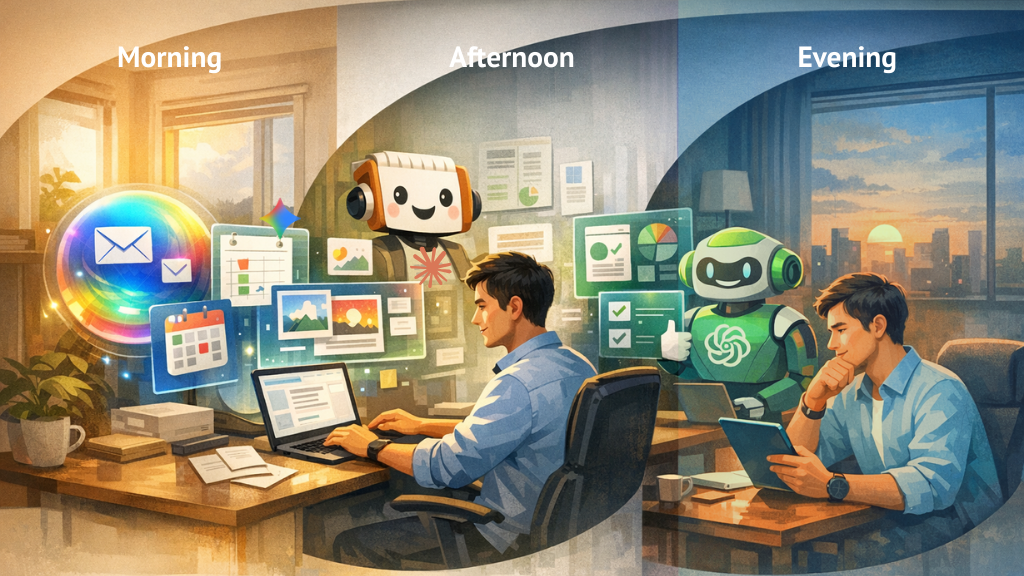
- Morning: AI summarizes emails and sets your schedule.
- Afternoon: AI handles content creation and data reconciliation.
- Evening: Review AI feedback and decide tomorrow’s strategy.
⏰ 09:00 | Inbox & Schedule | Gemini
“Summarize my unread emails in Gmail and highlight urgent tasks.”
(Leverage Google Workspace integration)
⏰ 10:00 | Content Creation | Claude
“Use my brand voice to draft 3 LinkedIn posts and 1 newsletter based on this week’s trends.”
(Turn on Artifacts feature to preview in real-time)
⏰ 11:30 | Client Meeting | ChatGPT
Activate Vision mode in the mobile app to record meeting notes in real-time and get instant voice briefings on key points you missed during the conversation.
⏰ 13:30 | Market Research | Gemini
“Analyze these 5 competitor YouTube videos and find 3 gaps in their strategy.”
(Just drop the YouTube links and you’re done)
⏰ 15:00 | Operation & Coding | ChatGPT (Agent)
“Update my Shopify inventory based on this morning’s sales CSV file.”
(Upload the file and execute the command)
⏰ 16:30 | Daily Wrap-up | Claude
“Critique my work today and suggest 3 ways to improve efficiency tomorrow.”
(Dump all of today’s outputs and request feedback)